> ## Documentation Index
> Fetch the complete documentation index at: https://docs.cripto.host/llms.txt
> Use this file to discover all available pages before exploring further.
# Hychain
## **What is Hychain?**
Hychain is a scalable Layer 2 blockchain built on Arbitrum technology, designed specifically for Web3 gaming. Formerly known as HYTOPIA (an evolution of the NFT Worlds project), it was founded in 2022 by the original NFT Worlds team following Minecraft's ban on NFTs.
The network serves as a "digital home" where game developers can build, own, and monetize experiences within a decentralized ecosystem. Hychain offers frictionless player onboarding, zero gas fees for end-users, and an intuitive API for developers—all optimized for the gaming industry's specific needs.
The network is driven by the native token **\$TOPIA**, which functions as the primary medium of exchange for in-game assets, marketplace transactions, network fees, staking, and governance. Guardian Nodes form the network's participation mechanism; traded as NFTs, they allow operators to earn rewards in \$TOPIA and receive a 25% share of all transaction fees generated on the network.
## **User Guide (Hychain)**
## Objective
Configure the required data to run your **Hychain Node** on:
👉 [https://cripto.host/](https://cripto.host/)
Follow the steps carefully to ensure proper wallet setup, token preparation, and delegation permissions.
***
# Step-by-Step Setup
***
## 1. Create a New Wallet in MetaMask (Required)
You must use **MetaMask**.
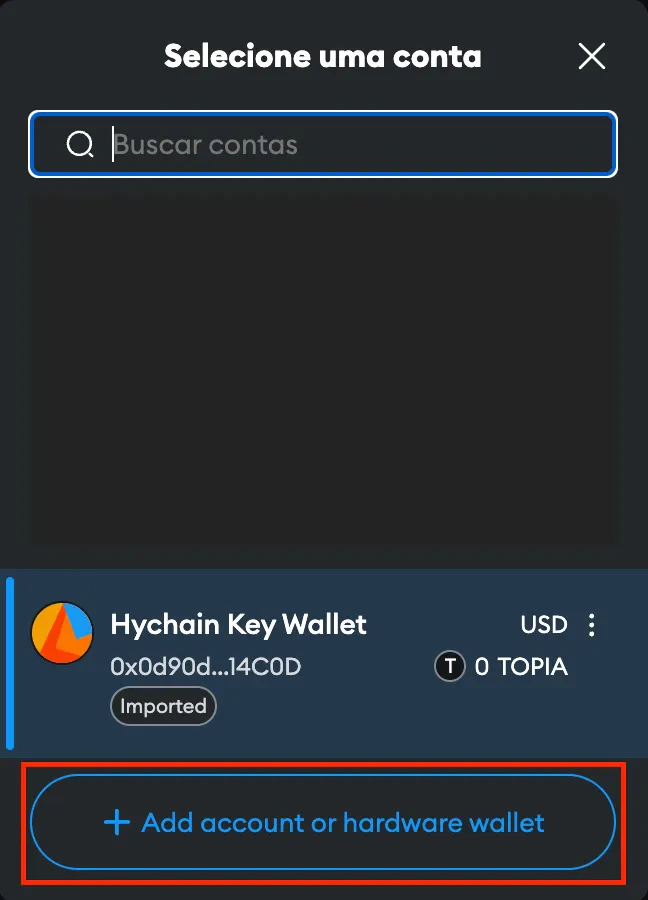
### 1.1 Open the Wallet List
Click on the wallet selector inside MetaMask.
 ***
### 1.2 Add a New Account
Click:
**“Add Account”** or **“Add Hardware Wallet”**
***
### 1.2 Add a New Account
Click:
**“Add Account”** or **“Add Hardware Wallet”**
 ***
### 1.3 Create a New Account
Select:
**“Create New Account”**
This will be your **Operator Burn Wallet**.
***
## 2. Fund Your Operator Wallet with \$TOPIA
This balance is required for:
* Paying challenge reception fees
* Claiming rewards
* Network transaction fees
You will first need \$WRLD and then bridge to \$TOPIA.
***
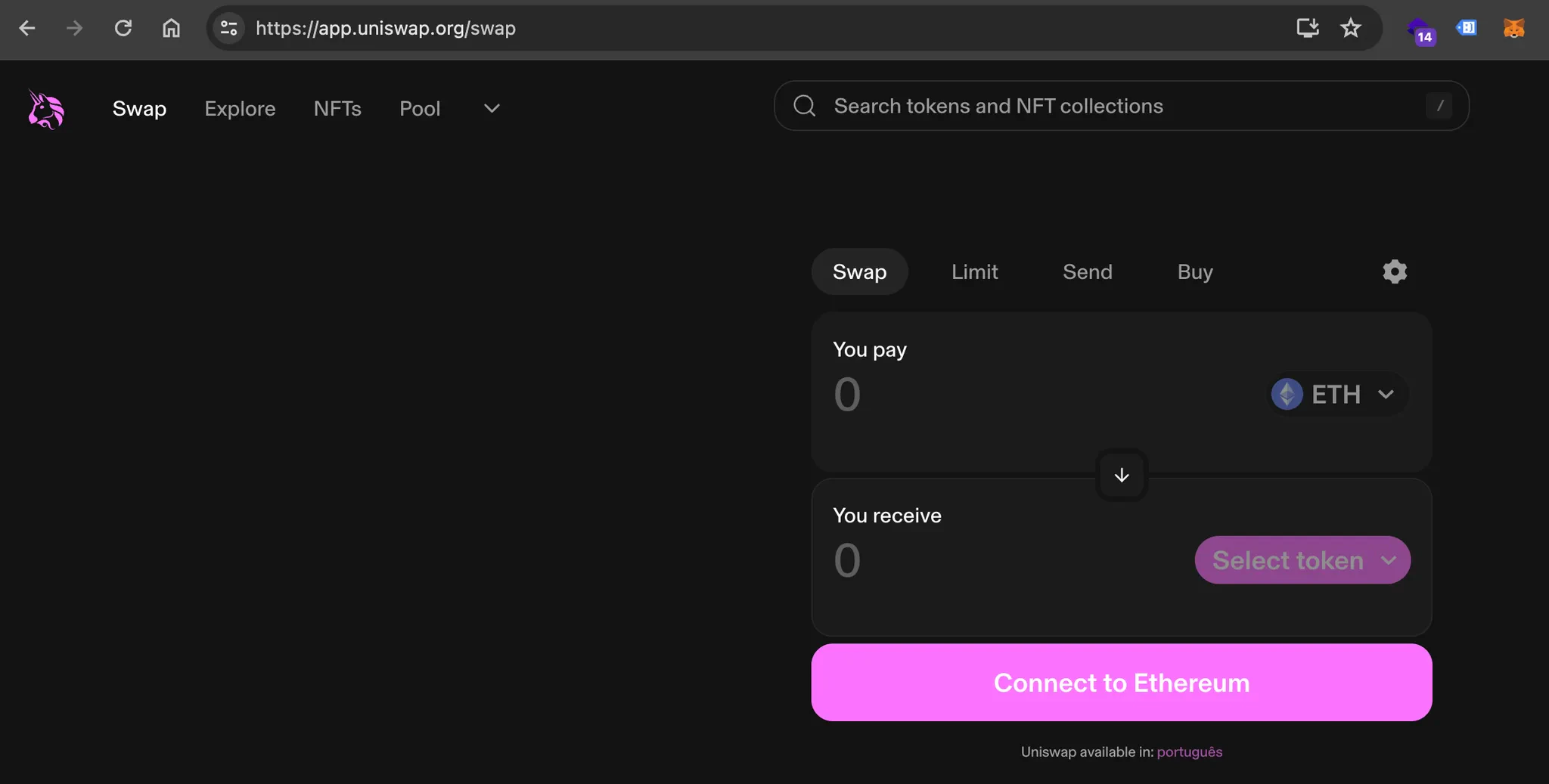
### 2.1 Access Uniswap
👉 [https://app.uniswap.org/swap](https://app.uniswap.org/swap)
***
### 1.3 Create a New Account
Select:
**“Create New Account”**
This will be your **Operator Burn Wallet**.
***
## 2. Fund Your Operator Wallet with \$TOPIA
This balance is required for:
* Paying challenge reception fees
* Claiming rewards
* Network transaction fees
You will first need \$WRLD and then bridge to \$TOPIA.
***
### 2.1 Access Uniswap
👉 [https://app.uniswap.org/swap](https://app.uniswap.org/swap)
 ***
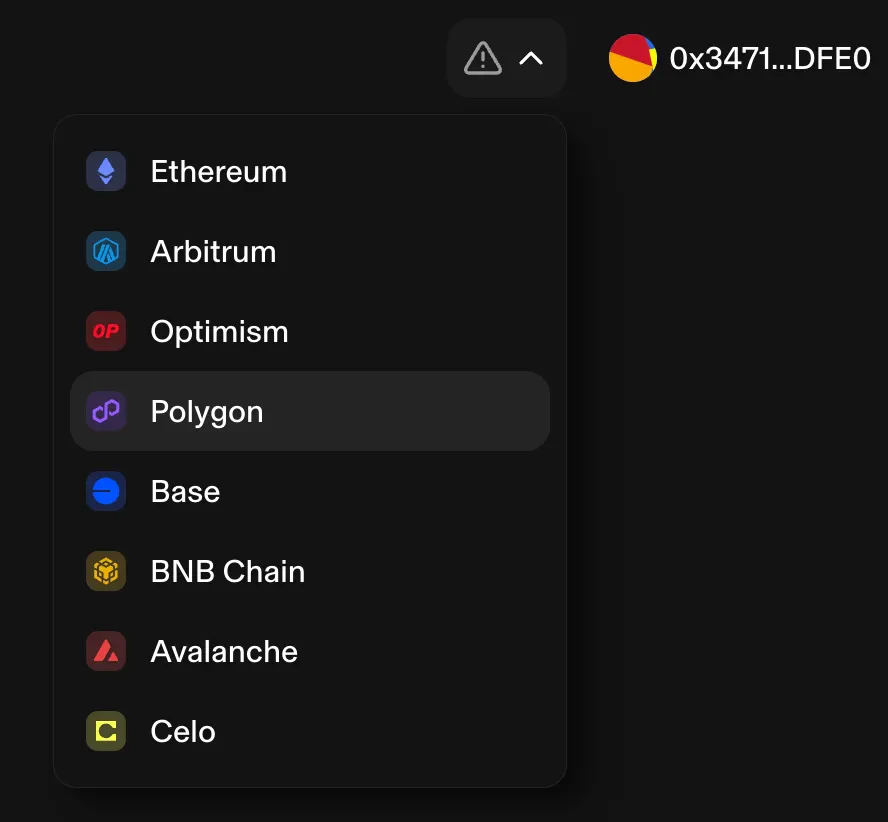
### 2.2 Select the Polygon Network
Switch the network to **Polygon** inside Uniswap.
***
### 2.2 Select the Polygon Network
Switch the network to **Polygon** inside Uniswap.
 ***
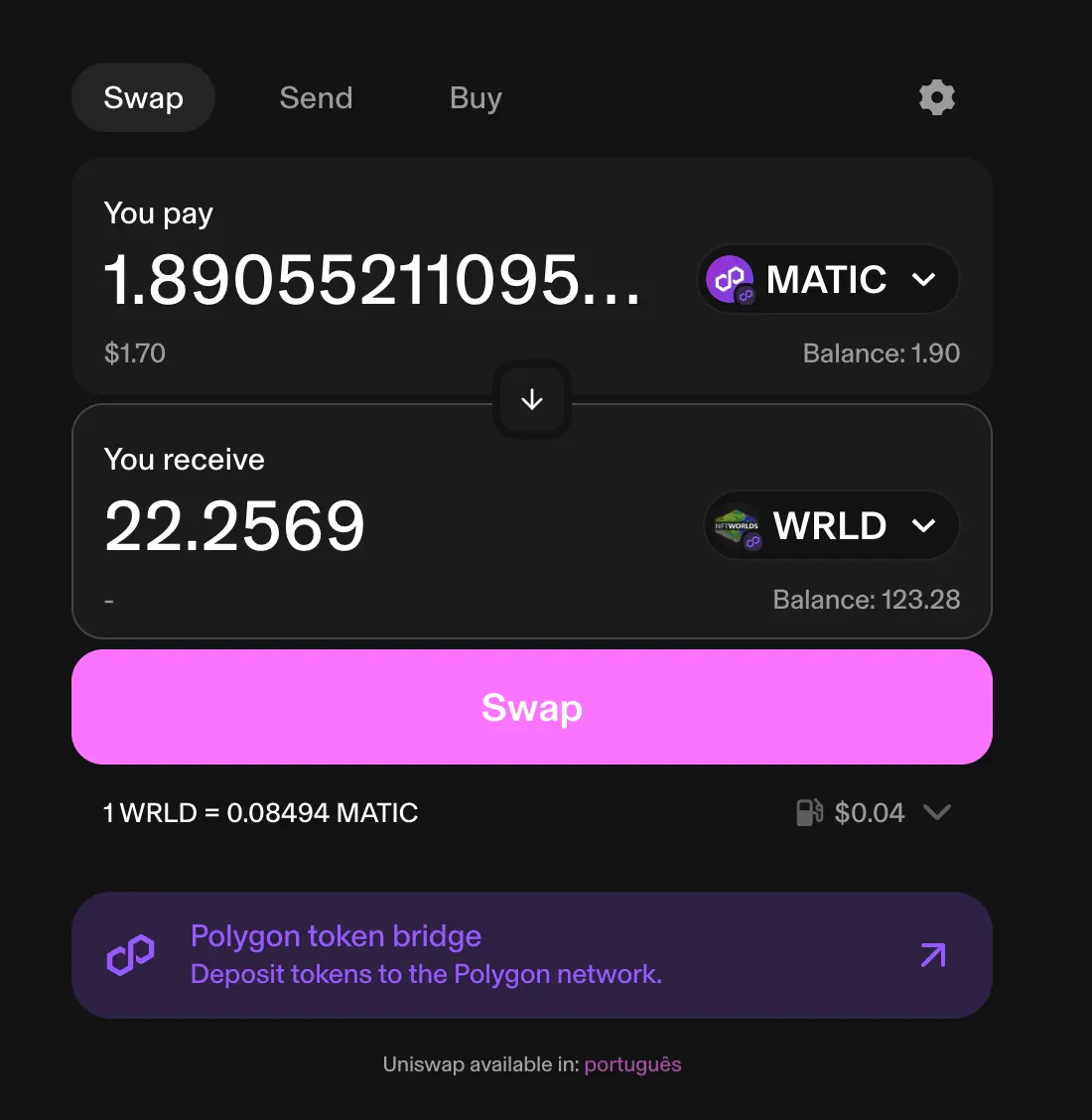
### 2.3 Swap \$MATIC → \$WRLD
Swap:
**\$MATIC → \$WRLD**
Recommended minimum: **\~\$20 USD equivalent**
You may use another token swappable to \$WRLD if preferred.
***
### 2.3 Swap \$MATIC → \$WRLD
Swap:
**\$MATIC → \$WRLD**
Recommended minimum: **\~\$20 USD equivalent**
You may use another token swappable to \$WRLD if preferred.
 ***
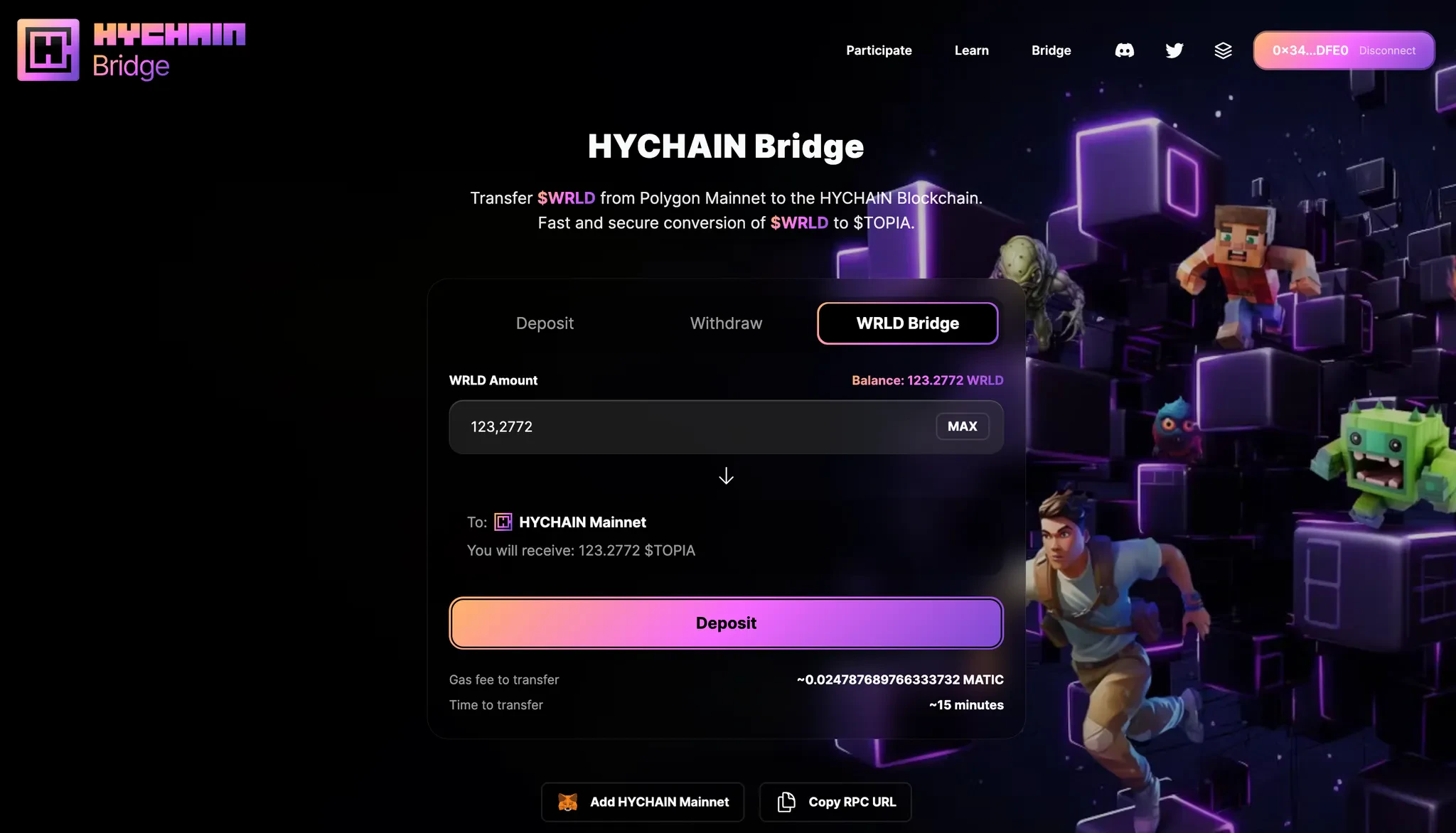
### 2.4 Bridge \$WRLD → \$TOPIA
Access the official Hychain Bridge:
👉 [https://bridge.hychain.com/bridge/](https://bridge.hychain.com/bridge/)
If you do not have Hychain Mainnet added:
Click **“Add HYCHAIN Mainnet”**
***
### 2.4 Bridge \$WRLD → \$TOPIA
Access the official Hychain Bridge:
👉 [https://bridge.hychain.com/bridge/](https://bridge.hychain.com/bridge/)
If you do not have Hychain Mainnet added:
Click **“Add HYCHAIN Mainnet”**
 ***
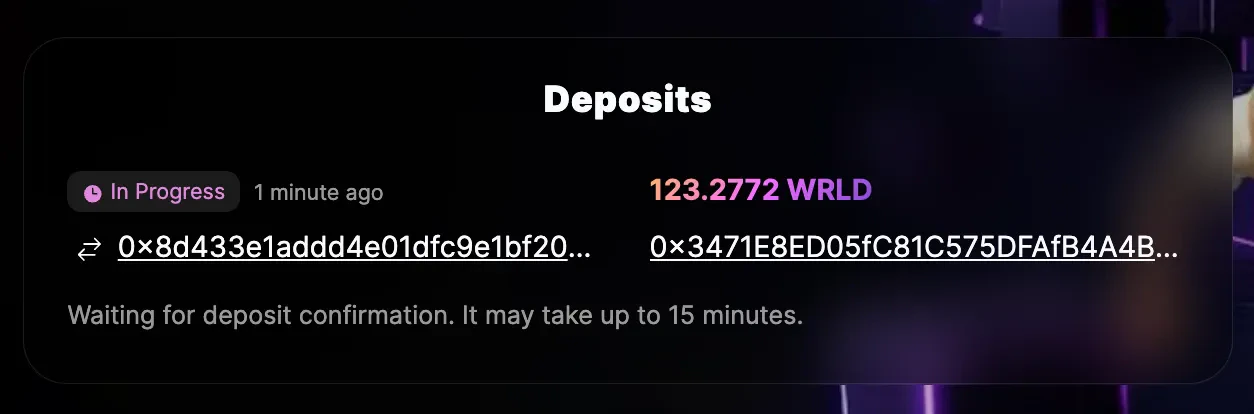
### 2.5 Wait for Bridge Completion
The bridge transaction takes approximately:
⏱ \~15 minutes
Once completed, you will receive **\$TOPIA** in your Operator Wallet.
***
### 2.5 Wait for Bridge Completion
The bridge transaction takes approximately:
⏱ \~15 minutes
Once completed, you will receive **\$TOPIA** in your Operator Wallet.
 ***
### 2.6 Minimum Required
Send at least:
**5 \$TOPIA**
to your wallet with the Hychain Key.
This covers [Delegate.xyz](http://Delegate.xyz) permission transaction fees.
***
## 3. Grant Permission to Your Operator Wallet ([Delegate.xyz](http://Delegate.xyz))
You must authorize your Operator Wallet to manage your Hychain Keys.
***
### 3.1 Access Delegate
👉 [https://delegate.xyz/?chainId=2911\&contract=0xE1060b30D9fF01Eef71248906Ce802801a670A48](https://delegate.xyz/?chainId=2911\&contract=0xE1060b30D9fF01Eef71248906Ce802801a670A48)
***
### 2.6 Minimum Required
Send at least:
**5 \$TOPIA**
to your wallet with the Hychain Key.
This covers [Delegate.xyz](http://Delegate.xyz) permission transaction fees.
***
## 3. Grant Permission to Your Operator Wallet ([Delegate.xyz](http://Delegate.xyz))
You must authorize your Operator Wallet to manage your Hychain Keys.
***
### 3.1 Access Delegate
👉 [https://delegate.xyz/?chainId=2911\&contract=0xE1060b30D9fF01Eef71248906Ce802801a670A48](https://delegate.xyz/?chainId=2911\&contract=0xE1060b30D9fF01Eef71248906Ce802801a670A48)
 ***
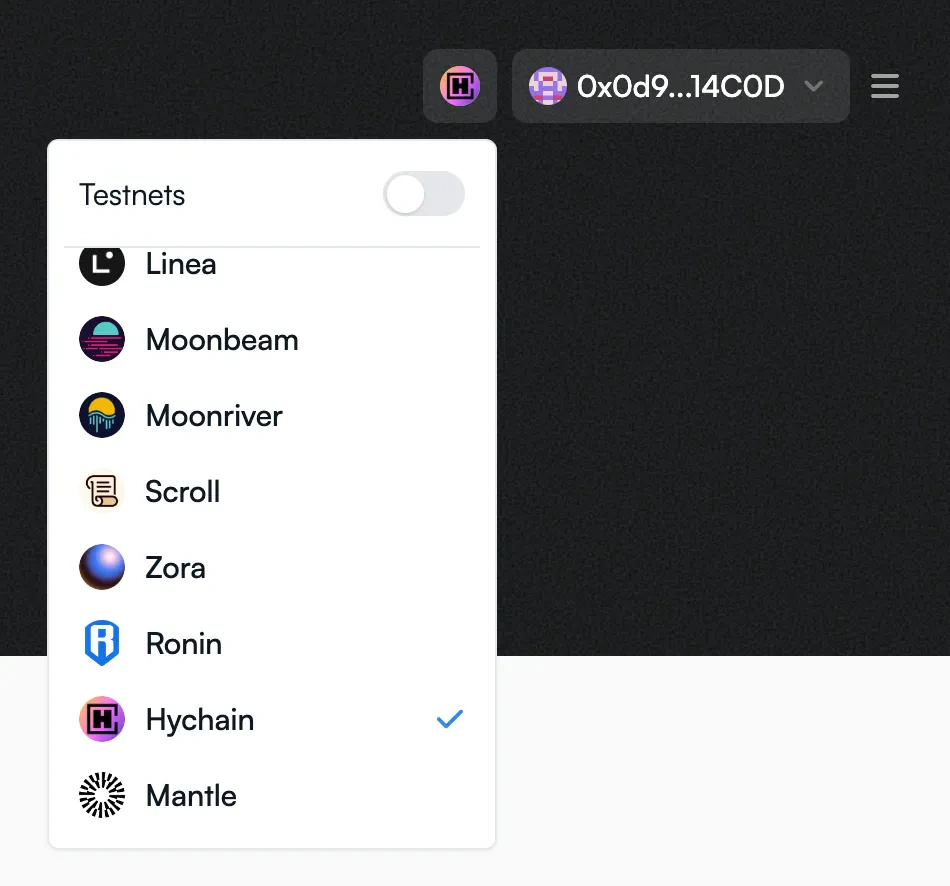
### 3.2 Verify Network & Wallet
Ensure:
* Connected wallet = Wallet with Hychain Key
* Network = **Hychain (Chain ID 2911)**
***
### 3.2 Verify Network & Wallet
Ensure:
* Connected wallet = Wallet with Hychain Key
* Network = **Hychain (Chain ID 2911)**
 ***
### 3.3 Submit Delegation
1. Enter your **Operator Burn Wallet public address**
2. Click **Submit Delegation**
Contract used:
`0xE1060b30D9fF01Eef71248906Ce802801a670A48`
***
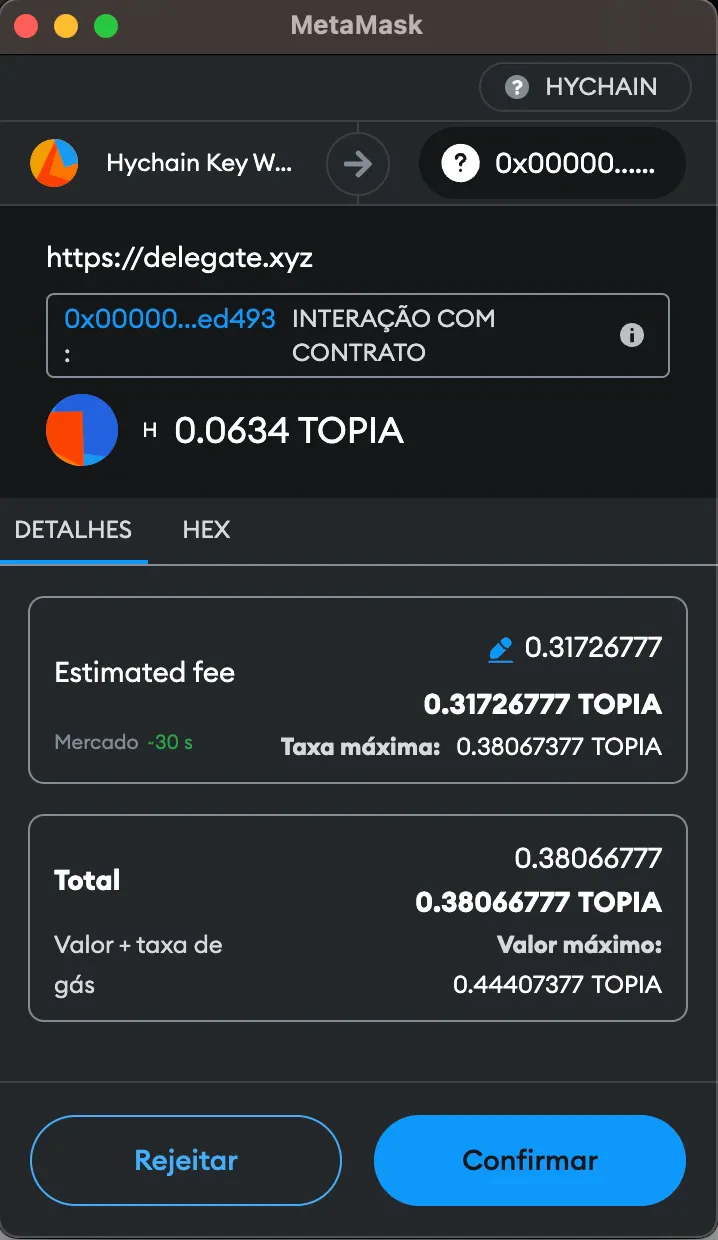
### 3.4 Approve the Transaction
Approve the transaction in MetaMask.
Network fees will be paid in **\$TOPIA**.
***
### 3.3 Submit Delegation
1. Enter your **Operator Burn Wallet public address**
2. Click **Submit Delegation**
Contract used:
`0xE1060b30D9fF01Eef71248906Ce802801a670A48`
***
### 3.4 Approve the Transaction
Approve the transaction in MetaMask.
Network fees will be paid in **\$TOPIA**.
 ***
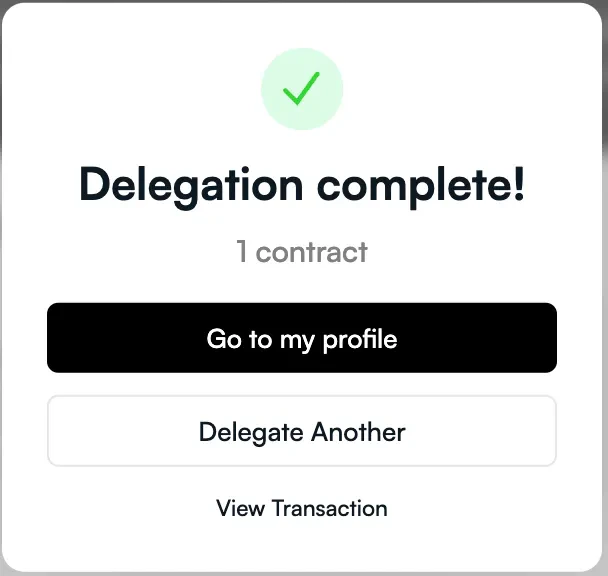
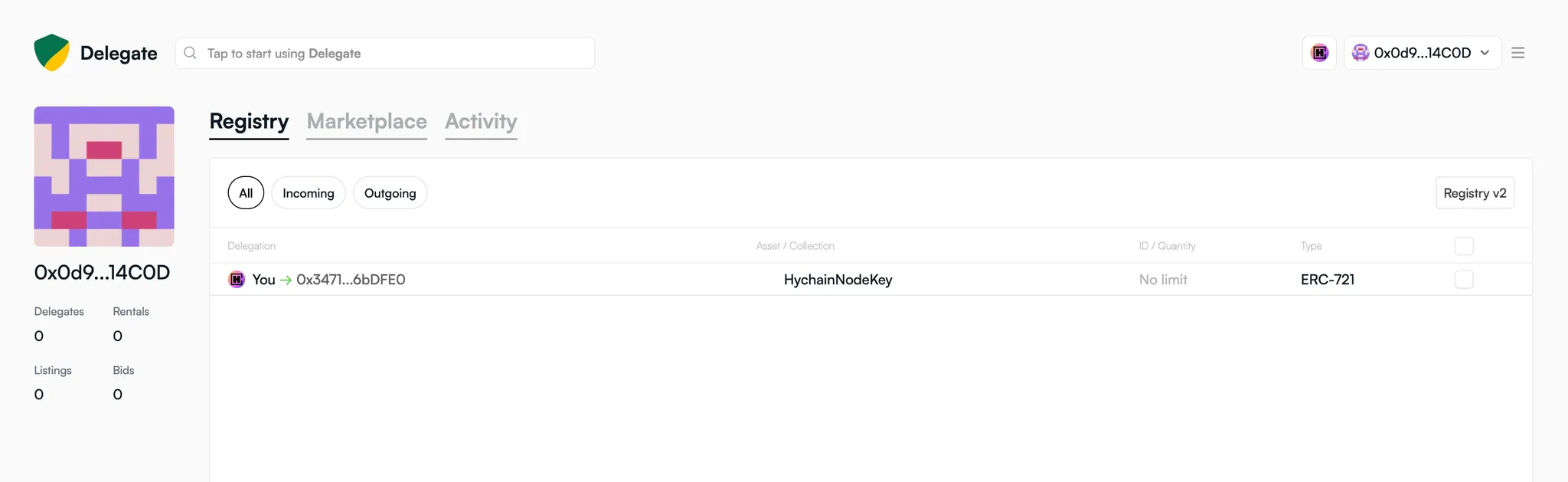
### 3.5 Delegation Completed
Permission is now granted successfully.
***
### 3.5 Delegation Completed
Permission is now granted successfully.
 ***
## 4. Deploy the Node on Cripto Host
***
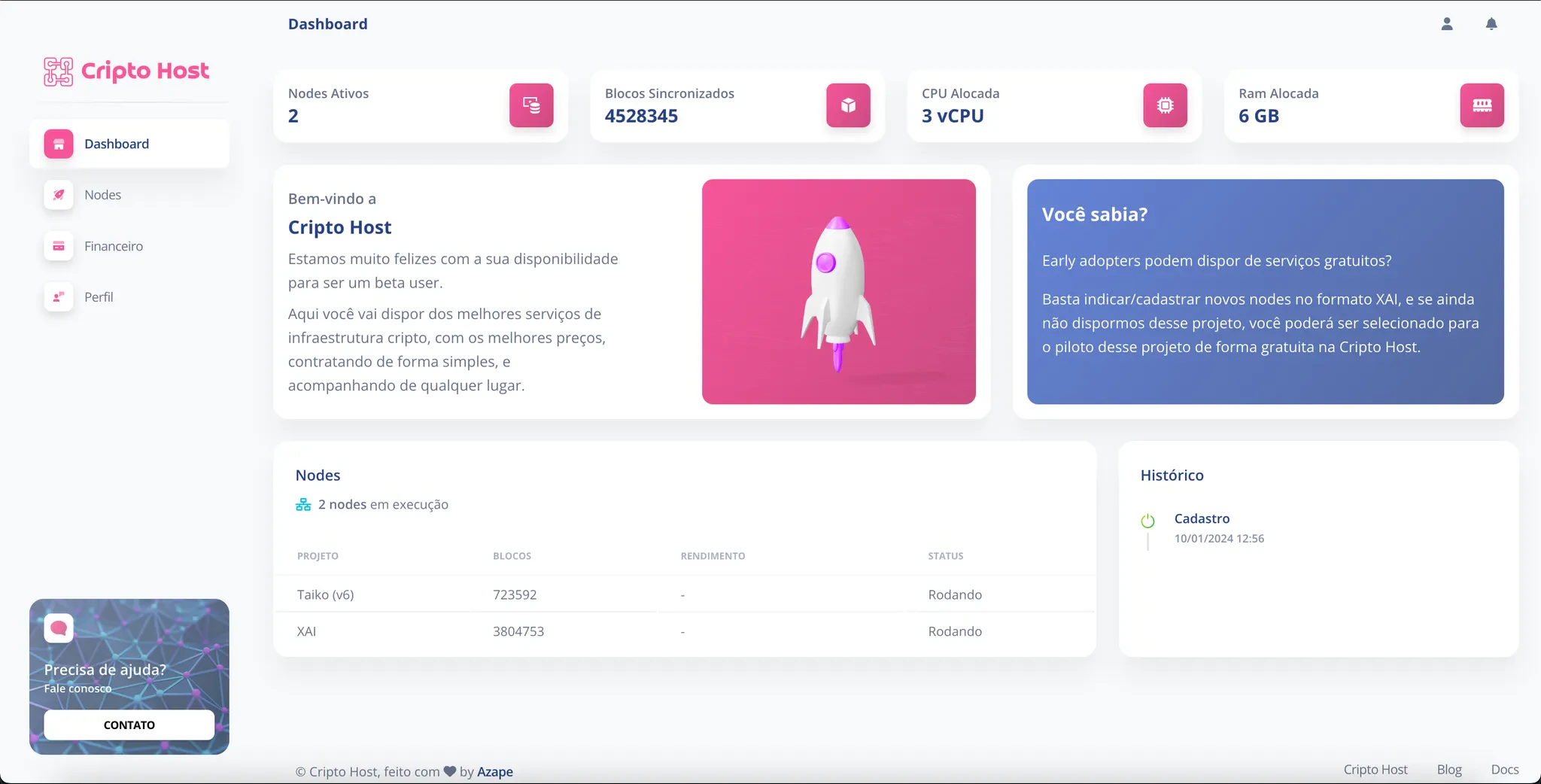
### 4.1 Access the Platform
👉 [https://app.cripto.host/](https://app.cripto.host/)
***
## 4. Deploy the Node on Cripto Host
***
### 4.1 Access the Platform
👉 [https://app.cripto.host/](https://app.cripto.host/)
 ***
### 4.2 Create a New Node
1. Go to **Nodes**
2. Click **Add Node**
3. Select **Hychain Project**
***
### 4.3 Fill in the Required Information
You will need:
***
### 4.2 Create a New Node
1. Go to **Nodes**
2. Click **Add Node**
3. Select **Hychain Project**
***
### 4.3 Fill in the Required Information
You will need:
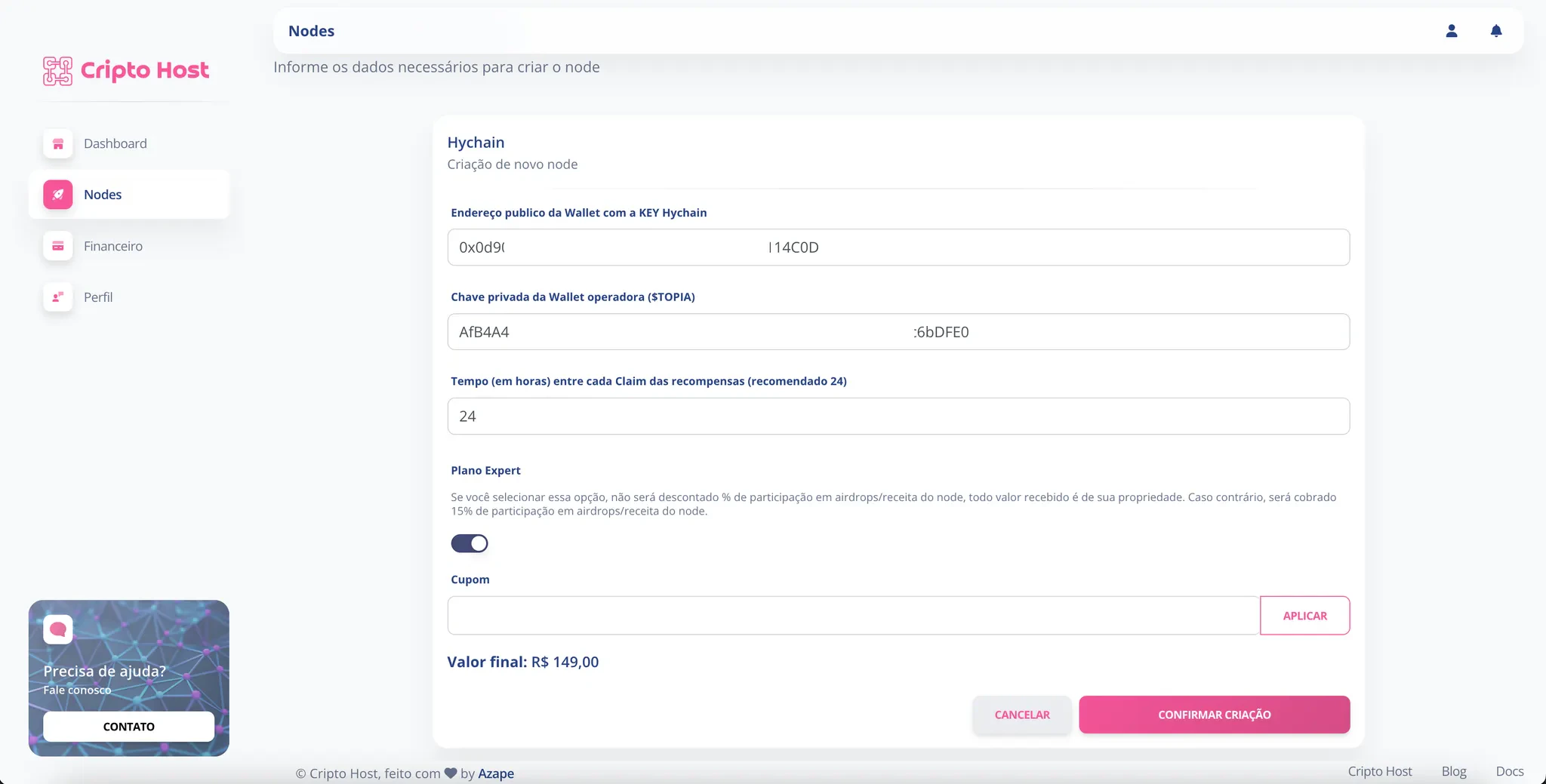 ***
#### Public Address (Hychain Key Wallet)
Enter the **public key** of your wallet that holds the Hychain Key.
***
#### Private Key (Operator Wallet)
Enter the **private key of your Operator Burn Wallet**.
⚠️ This is NOT the seed phrase.\
It is the specific private key of that wallet account.
***
#### Auto-Claim Interval
Choose how often rewards should be claimed automatically.
Recommended:
**Every 24 hours**
Each claim consumes \$TOPIA in network fees.
***
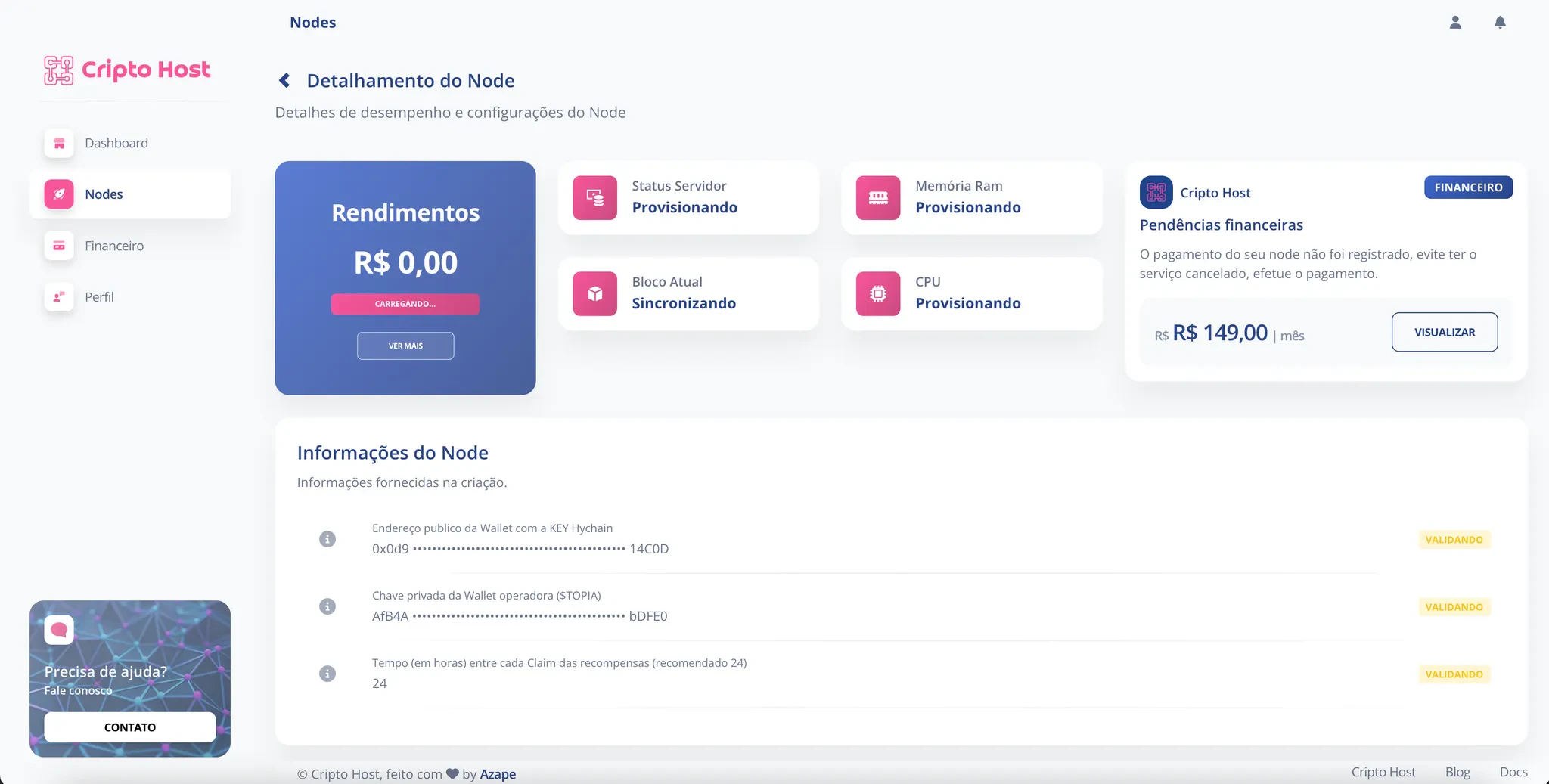
### 4.4 Confirm Creation
Click **Confirm Creation**.
***
### 4.5 Complete Subscription Payment
Open your deployed Hychain node and complete the subscription payment.
***
#### Public Address (Hychain Key Wallet)
Enter the **public key** of your wallet that holds the Hychain Key.
***
#### Private Key (Operator Wallet)
Enter the **private key of your Operator Burn Wallet**.
⚠️ This is NOT the seed phrase.\
It is the specific private key of that wallet account.
***
#### Auto-Claim Interval
Choose how often rewards should be claimed automatically.
Recommended:
**Every 24 hours**
Each claim consumes \$TOPIA in network fees.
***
### 4.4 Confirm Creation
Click **Confirm Creation**.
***
### 4.5 Complete Subscription Payment
Open your deployed Hychain node and complete the subscription payment.
 ***
# Process Completed
Your Hychain Node is now fully configured and operational. 🏆
***
# What Happens Next?
* ✅ The node begins processing challenges automatically
* ✅ Rewards accumulate in your wallet
* ✅ Claims execute automatically at your selected interval
* ✅ Cripto Host ensures ≥99% uptime
* ✅ 24/7 infrastructure monitoring
***
# Security Best Practices
* Always use a **Burn Wallet**
* Never use your primary holding wallet
* Store private keys securely
* Never share your seed phrase
***
# Process Completed
Your Hychain Node is now fully configured and operational. 🏆
***
# What Happens Next?
* ✅ The node begins processing challenges automatically
* ✅ Rewards accumulate in your wallet
* ✅ Claims execute automatically at your selected interval
* ✅ Cripto Host ensures ≥99% uptime
* ✅ 24/7 infrastructure monitoring
***
# Security Best Practices
* Always use a **Burn Wallet**
* Never use your primary holding wallet
* Store private keys securely
* Never share your seed phrase