> ## Documentation Index
> Fetch the complete documentation index at: https://docs.cripto.host/llms.txt
> Use this file to discover all available pages before exploring further.
# Nibiru
## **What is Nibiru?**
Nibiru is a high-performance Layer 1 blockchain built on the Cosmos SDK and Tendermint BFT. It is designed to support scalable Web3 applications in DeFi, gaming, NFTs, and Real-World Assets (RWA). Nibiru prioritizes superior throughput (up to 100,000 TPS), interoperability via IBC, and a "Super App" ecosystem integrating perpetuals, spot trading, swaps, and stablecoins.
Founded in 2021, the project aims to unify leveraged derivatives, spot trading, staking, and liquidity into a seamless experience for users across 40+ chains. It employs modules such as **Nibi-Perps** (a perpetuals DEX with ALP and decentralized oracles), **Nibi-Swap** (AMM), **NUSD** (collateralized stablecoin), and an Oracle Module for secure, real-world data.
Unlike fragmented platforms, Nibiru rewards developers with fees based on time-weighted Total Value Locked (TVL), promoting sustainable growth. It ensures adoption through EVM and Wasm compatibility for secure contract execution.
The network is powered by **\$NIBI** (total supply: 1 billion), used for gas fees, staking/delegating to PoS validators, governance, and accessing key features like oracles and perpetuals.
## **User Guide (Nibiru)**
## Prerequisites
Before getting started, make sure you have:
***
### Compatible Wallet
Install one of the following wallets:
* Leap Wallet
* Keplr Wallet
* Fox Wallet
* MetaMask
* Coinbase Wallet
Official wallet documentation:\
👉 [https://nibiru.fi/docs/wallets/](https://nibiru.fi/docs/wallets/)
***
### NIBI Tokens
You must hold at least:
**1 NIBI** (approx. R\$ 0.07 as of 01/09/2026 — price may vary)
Check the latest price via market trackers.
You can purchase NIBI on exchanges such as:
* Bybit — [https://www.bybit.com/](https://www.bybit.com/)
* Gate — [https://www.gate.com/](https://www.gate.com/)
* KuCoin — [https://www.kucoin.com/](https://www.kucoin.com/)
* MEXC — [https://www.mexc.com/](https://www.mexc.com/)
* CoinEx — [https://www.coinex.com/](https://www.coinex.com/)
***
### Cripto Host Account
You must have an active account:
👉 [https://cripto.host/](https://cripto.host/)
***
> 💡 **Note:**\
> Cripto Host provides compatible infrastructure.\
> No personal hardware configuration is required.
***
# Step-by-Step Setup
***
## 1. Deploy Your Node on Cripto Host
1. Log into your Cripto Host dashboard.
2. Select your desired plan (e.g., **Expert**).
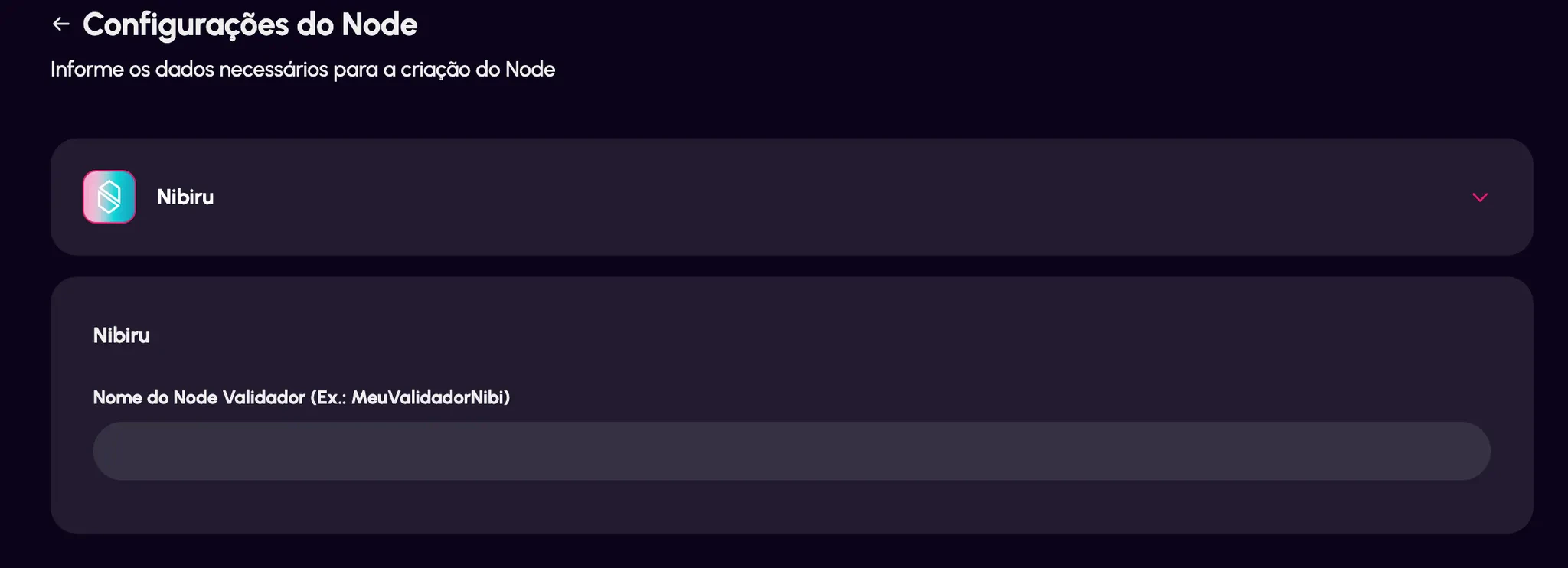
3. Define your **validator name** (for example: `MyNibiruValidator`).
 1. Complete the purchase.
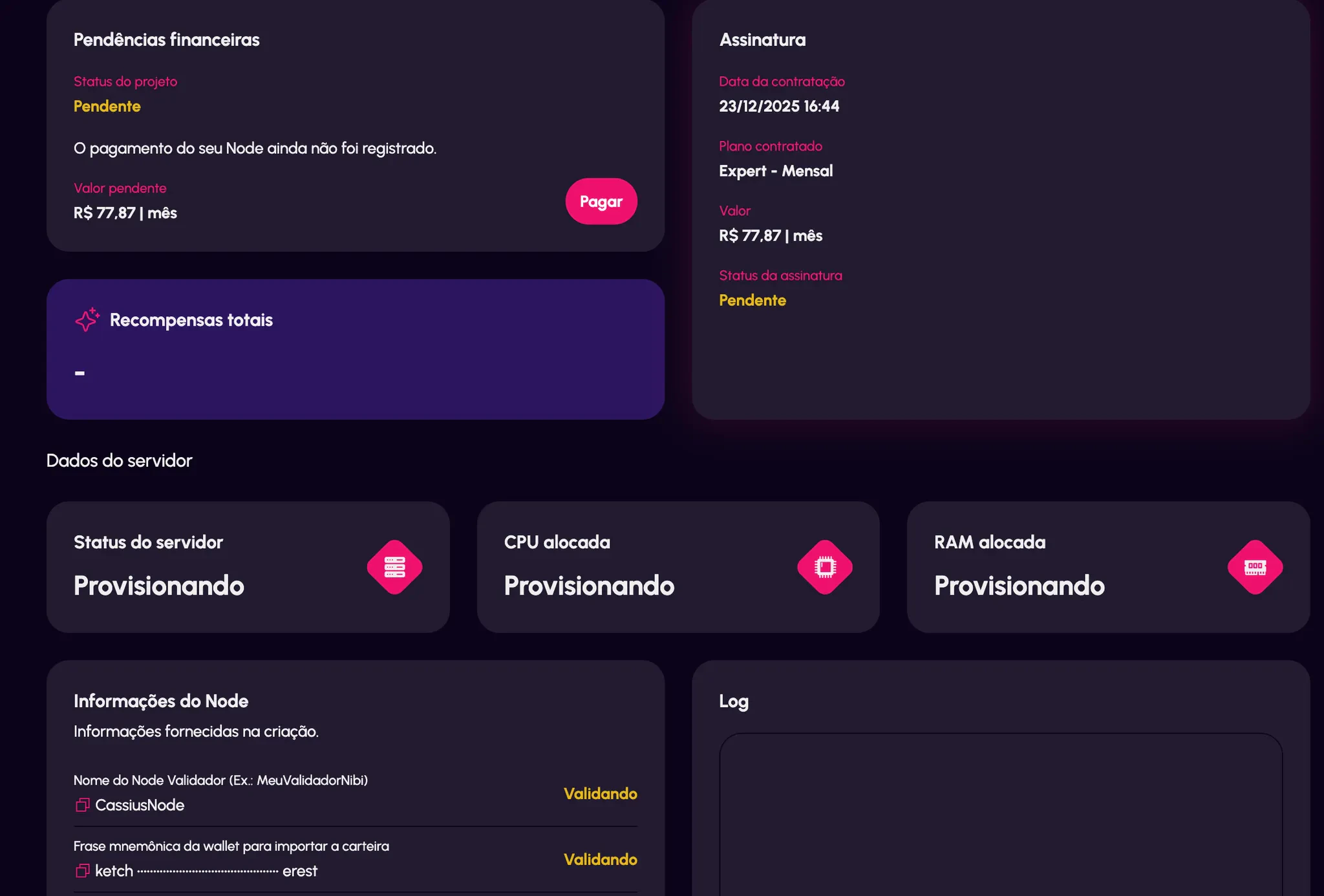
After confirmation, check your email.\
You will receive a **12-word seed phrase**.
1. Complete the purchase.
After confirmation, check your email.\
You will receive a **12-word seed phrase**.
 ***
## 2. Restore Your Wallet (Leap or Keplr)
1. Open your wallet extension.
2. Click **“Restore Wallet.”**
3. Enter the **12-word seed phrase** provided by Cripto Host.
4. Complete the setup process.
Once restored:
* Copy your wallet address (it begins with **"nibi"**).
* Transfer your NIBI tokens from your exchange to this address.
***
## 3. Delegate Your NIBI
1. Open the official **Nibiru web application**.
2. Click **“Connect Wallet.”**
3. Select the **Cripto Host validator** (the name you defined earlier).
4. Enter the amount of **NIBI** you want to delegate.
5. Approve and sign the transaction in your wallet.
6. Verify the delegation under **“My Delegations.”**
***
# What Happens Next?
After delegation:
* ✅ **Automatic Rewards**\
Earn NIBI daily.
* ✅ **24/7 Monitoring**\
Cripto Host guarantees ≥99% uptime.
* ✅ **Dashboard Access**\
Track rewards and node status via your Cripto Host panel.
* ✅ **Technical Support**\
Contact official Cripto Host support if needed.
***
# Useful Links
* Official Website — [https://nibiru.fi/](https://nibiru.fi/)
* Documentation — [https://nibiru.fi/docs/](https://nibiru.fi/docs/)
* Block Explorer — [https://nibiru.explorers.guru/](https://nibiru.explorers.guru/)
* CoinMarketCap — [https://coinmarketcap.com/currencies/nibiru-chain/](https://coinmarketcap.com/currencies/nibiru-chain/)
***
## 2. Restore Your Wallet (Leap or Keplr)
1. Open your wallet extension.
2. Click **“Restore Wallet.”**
3. Enter the **12-word seed phrase** provided by Cripto Host.
4. Complete the setup process.
Once restored:
* Copy your wallet address (it begins with **"nibi"**).
* Transfer your NIBI tokens from your exchange to this address.
***
## 3. Delegate Your NIBI
1. Open the official **Nibiru web application**.
2. Click **“Connect Wallet.”**
3. Select the **Cripto Host validator** (the name you defined earlier).
4. Enter the amount of **NIBI** you want to delegate.
5. Approve and sign the transaction in your wallet.
6. Verify the delegation under **“My Delegations.”**
***
# What Happens Next?
After delegation:
* ✅ **Automatic Rewards**\
Earn NIBI daily.
* ✅ **24/7 Monitoring**\
Cripto Host guarantees ≥99% uptime.
* ✅ **Dashboard Access**\
Track rewards and node status via your Cripto Host panel.
* ✅ **Technical Support**\
Contact official Cripto Host support if needed.
***
# Useful Links
* Official Website — [https://nibiru.fi/](https://nibiru.fi/)
* Documentation — [https://nibiru.fi/docs/](https://nibiru.fi/docs/)
* Block Explorer — [https://nibiru.explorers.guru/](https://nibiru.explorers.guru/)
* CoinMarketCap — [https://coinmarketcap.com/currencies/nibiru-chain/](https://coinmarketcap.com/currencies/nibiru-chain/)