

What is Lava Network?
Lava Network is a modular, decentralized blockchain data access infrastructure (RPC and API), built as an appchain on the Cosmos SDK with DPoS consensus. It is designed to provide reliable, high-performance data across 30+ chains for dApps, wallets, and exchanges. Founded in 2021, the project connects node operators with data consumers requiring resilient RPC services for critical on-chain actions like swaps, minting, and transactions. The network processes billions of daily requests using routing optimized for geolocation and Quality of Service (QoS). Unlike centralized providers prone to downtime and censorship, Lava creates a competitive peer-to-peer market that improves uptime (99.99%), reduces latency, and allows permissionless integration of new chains via modular specifications, democratizing universal multi-chain data access. The network runs on the native token $LAVA (total supply: 1 billion), used for payments, staking for validators and RPC providers, governance, and penalties for poor performance, constantly incentivizing quality and decentralization.User Guide (Lava Network)
Prerequisites
Before getting started, make sure you have:Compatible Wallet
You must use Keplr Wallet, available as a browser extension or mobile app. 👉 https://keplr.app/ During setup, make sure the Lava mainnet (not testnet) is added to your wallet.LAVA Tokens
You must hold:- 4,000 LAVA
- Approx. ~$488 USD (as of 11/19/2025 — check live price)
- KuCoin — https://www.kucoin.com/
- MEXC — https://www.mexc.com/
- Bybit — https://www.bybit.com/
- Gate.io — https://www.gate.io/
Cripto Host Account
You must have an active account: 👉 https://cripto.host/💡 Note:
- The Expert Plan includes dedicated infrastructure configured to run a Lava provider node.
- The Basic Plan offers simple delegation to our validator machine, with a 5% commission on rewards.
- No personal hardware is required.
Step-by-Step Setup
Follow the steps below. Cripto Host automates the rest.1. Choose Your Plan on Cripto Host
Go to: 👉 https://cripto.host/ Select one of the following: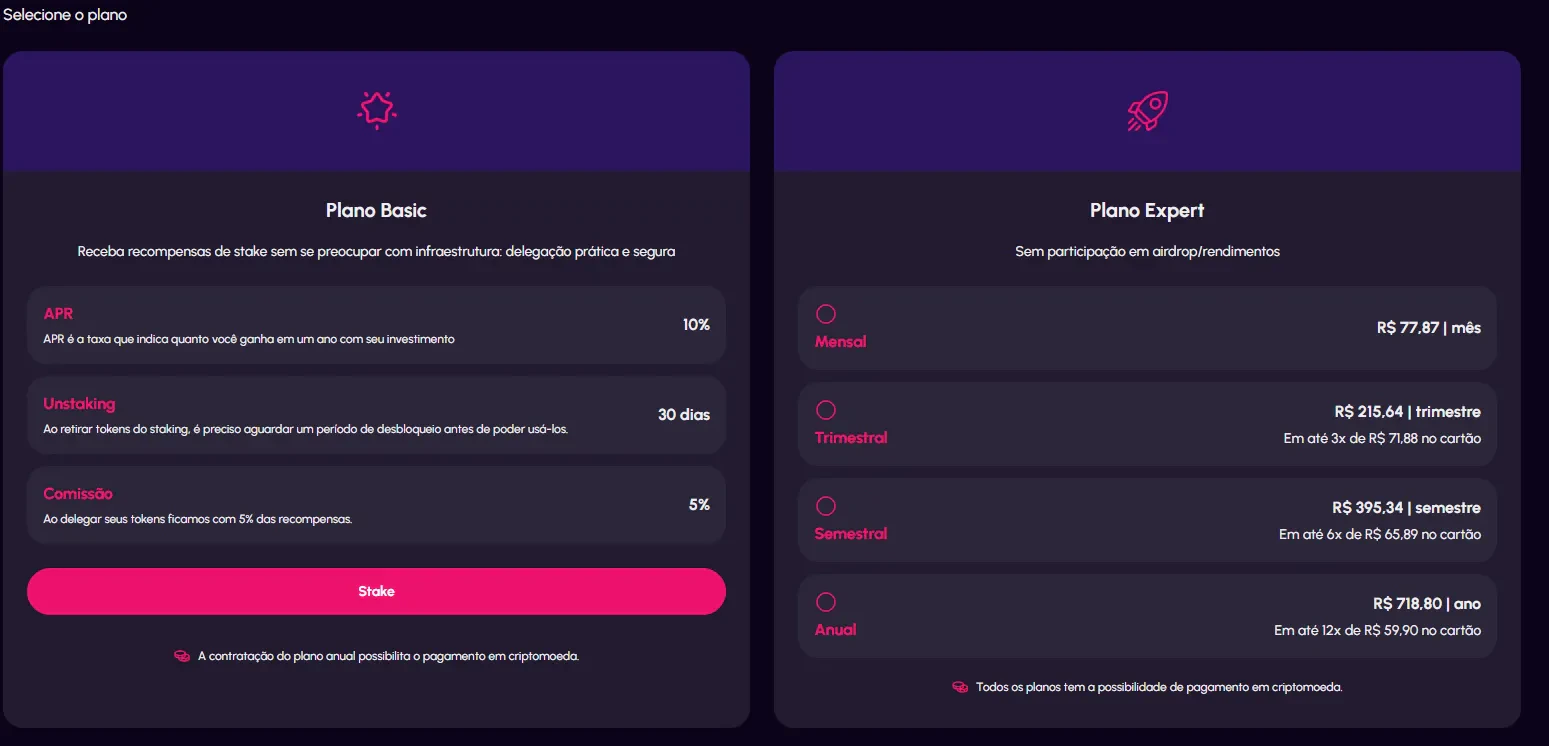
2. Retrieve Wallet Data from the Dashboard
Within approximately 20 minutes after purchase, access the Node Details page in your Cripto Host dashboard. You will find:- The automatically generated Lava wallet address
- The recovery seed phrase (12/24 words)
3. Configure Your Wallet in Keplr
Add the Lava Network to Keplr
If Lava is not already available:- Go to:
👉 https://chains.keplr.app/ - Search for Lava (Mainnet)
- Click “Add to Keplr”
- Approve the connection
Restore the Wallet
- Open Keplr
- Click “Import Wallet” or “Restore Wallet”
- Enter the seed phrase provided by Cripto Host
- Set a password
Deposit LAVA Tokens
To fund your node:- Open the Receive tab in Keplr
- Copy your Lava wallet address
- Transfer 4,000 LAVA from your exchange
- For Expert Plan → The Cripto Host script automatically proceeds with provider installation and staking.
- For Basic Plan → Simply delegate your LAVA tokens via the platform and start earning rewards.
4. Automatic Activation & Staking
Once the 4,000 LAVA deposit is confirmed on-chain:- The Cripto Host script automatically executes the required staking
- RPC endpoints are configured
- The provider node is activated
What Happens Next?
After activation:- ✅ Earn LAVA rewards for providing high-quality RPC services
- ✅ Performance-based distribution (stake + uptime dependent)
- ✅ 24/7 monitoring with ≥99% uptime guarantee
- ✅ SLA compliance aligned with Lava Network requirements
- ✅ Full dashboard visibility (rewards, status, metrics)
Useful Links
- Official Website — https://www.lavanet.xyz/
- Official Documentation — https://docs.lavanet.xyz/
- Keplr Wallet — https://keplr.app/
- CoinMarketCap — https://coinmarketcap.com/currencies/lava-network/